What the v0.7.1 preparation screens show
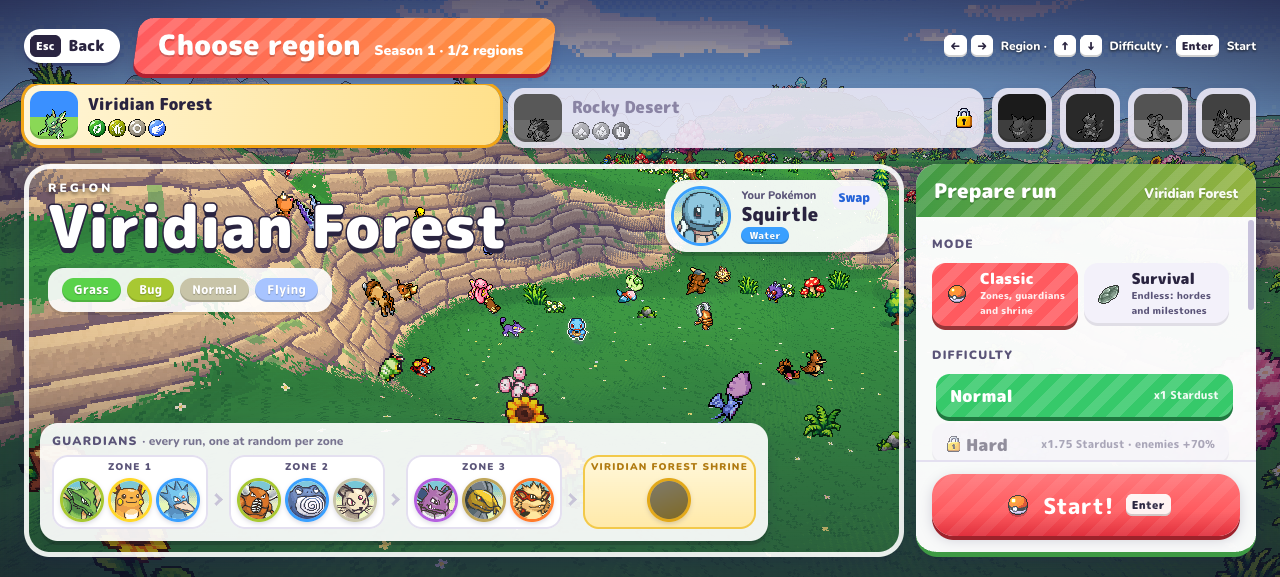
The comparison below was read before starting a run in Viridian Forest. It describes the menu, not completed clears or measured rewards. Rocky Desert was locked behind completing Viridian Forest on this fresh profile.
| Feature | Classic | Survival |
|---|---|---|
| Structure | Zones, guardians and shrine | One map; no zones or portals |
| Difficulty buttons observed | Normal, Hard, Nightmare | No equivalent buttons in the inspected panel |
| Progression markers | Guardians across three zones; region shrine | Boss milestone every 5 minutes; pact power in exchange for a curse |
| Later pressure | Follow the region objectives | Endless Night from minute 45 |
Difficulty multipliers are not farming-rate measurements
Classic’s menu shows Normal ×1 Stardust, Hard ×1.75 with enemies +70%, and Nightmare ×2.5 with enemies +160%. A larger listed multiplier does not establish more Stardust per minute: run duration, survival and credited rewards still matter.
Start with Classic if your goal is to learn its zone progression. Use Survival when you want to work on sustained survival on one map. These are choices based on the described structure, not a universal easiest-mode claim.
| Classic setting | Listed Stardust multiplier | Enemy modifier shown |
|---|---|---|
| Normal | ×1 | No extra modifier shown |
| Hard | ×1.75 | +70% |
| Nightmare | ×2.5 | +160% |
Survival milestones and comparable results
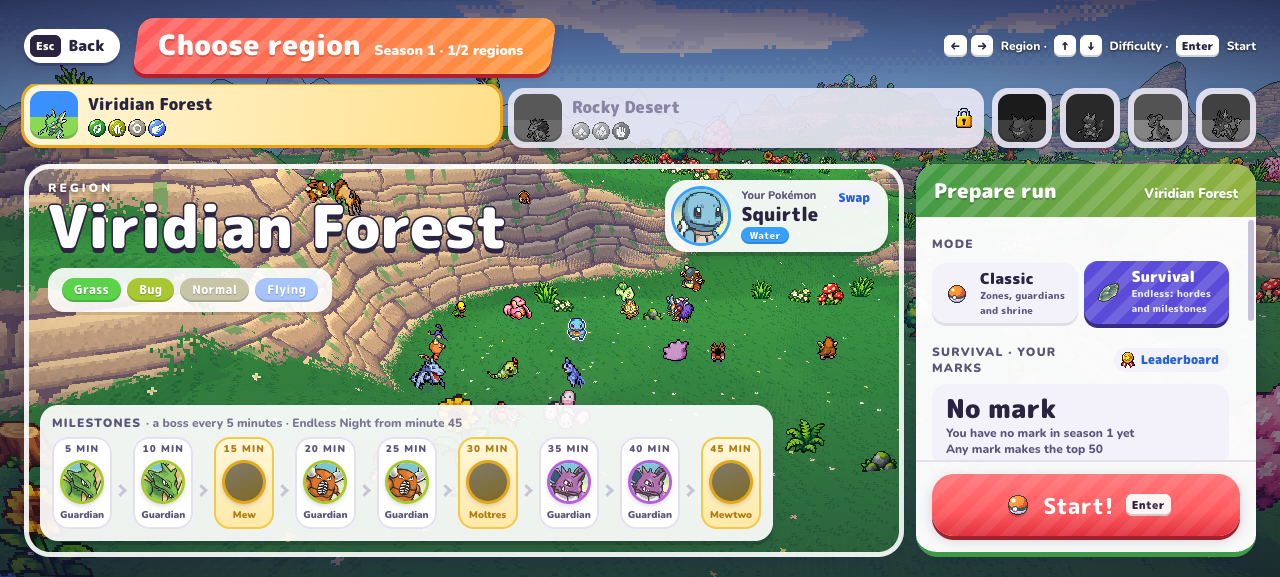
The inspected Viridian Forest panel names Mew at 15 minutes, Moltres at 30 and Mewtwo at 45, with Guardian milestones between them. These are displayed milestones; this research did not reach those bosses.
Keep mode, region, difficulty where applicable, starter and Lab setup in each run note. Compare actual credited Stardust over your actual time, including unsuccessful runs. Do not silently apply a Classic multiplier to Survival.
- Note partner, region, mode and the visible difficulty selection, if any.
- Keep major Lab upgrades and aiming settings consistent for a comparison.
- Include ordinary and unsuccessful attempts when estimating effort.
- Start a fresh sample if a patch changes the mode or its rewards.
Use the result for the next session
Once you have comparable completed results, use the reward guide to enter them into the planner. A budget estimate can help fit a target into the time you have, while a build comparison can help answer why a particular stage felt difficult.
There is no verified final-boss sequence or guaranteed first-win route on this page. The useful next step is to connect the mode you chose to an observation you can repeat.
Choosing PokeBonk game modes for reward comparisons
Use PokeBonk Classic to explore its zone progression, and Survival to compare sustained play on one map. For Stardust planning, record the mode before collecting results. Classic’s displayed difficulty multipliers do not prove a faster farming rate, and they should not be applied to Survival. Compare actual reward and time from PokeBonk runs with similar starting conditions.
Frequently asked questions
Does PokeBonk Classic difficulty apply to Survival?
The checked v0.7.1 Survival preparation screen did not show Classic’s difficulty buttons. Keep Classic difficulty multipliers separate from Survival reward measurements.
Which mode is best for Stardust?
The menu multipliers alone cannot answer that. Compare credited rewards and time under consistent conditions; no controlled best-mode farming result is established here.
Sources & research notes
The sources below distinguish our menu observations, original announcements, community reports and browser documentation. Check the version and scope before applying a value to your run.
- PokeBonk v0.7.1 — directly observed English menusOriginal project
Fresh Guest, zero completed runs and no purchases. Read starter passives, default keys, touch settings, 19 first-level Lab prices, the visible item pool, Squirtle’s move panel and mode preparation screens. Screenshots appear alongside the relevant guide sections. Combat outcomes, later-level prices and real-device touch performance were not tested.