Find the game’s touch-control switch
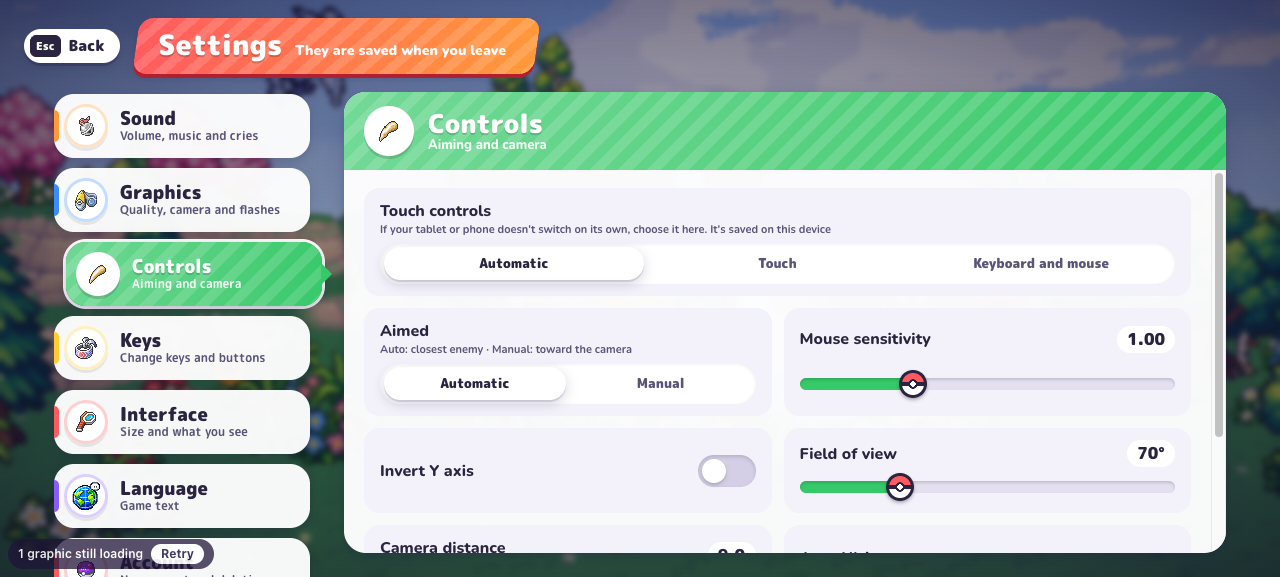
The v0.7.1 menu has Settings → Controls → Touch controls with Automatic, Touch, and Keyboard and mouse choices. It says the choice is saved on this device. If a phone or tablet does not switch automatically, choose Touch here.
We inspected this setting on a desktop browser. A visible menu option is not a real-phone compatibility test; loading, touch response and sustained frame rate still need to be checked on your device.
| Check | What success looks like |
|---|---|
| Display | The game scene and important text are visible. |
| Input | You can move, make choices and reach the game’s own pause control. |
| Continuity | You understand which browser context holds the session you want to keep. |
Give the game enough room
On a narrow screen this site shows a game launch card, so an undersized iframe does not occupy the page before you choose to play. Tap Expand game to load and enlarge the original, or use Open original for a separate tab.
Try landscape orientation inside the game. The surrounding guide uses a responsive layout, but the original game controls its own menu scale and touch layout. Pause inside the game before returning to a long guide or changing apps.
If the fullscreen button behaves differently
Browser fullscreen support and permissions vary, and the request requires a user action. On this site, the game can expand within the page when standard fullscreen is unavailable. Use the visible exit action to return to the normal layout.
If the embedded game still feels constrained, compare the original in a new tab. Keep the original session you care about available, and check the account or Guest identity before investing time in a second context.
Record a device-specific result
A useful mobile note includes the phone or tablet model, operating system, browser, orientation and the exact action that fails. “The scene renders, but I cannot reach pause” is much more actionable than “mobile does not work.”
If the scene is choppy, use the performance checklist. If it never appears, use the loading checklist. Enter planner numbers only after selecting a planner field, and return focus to the game before continuing play.
PokeBonk on iPhone or Android: a first check
Start PokeBonk in an expanded window and try landscape orientation so the original interface has more room. Inspect Settings → Controls if the expected touch layout does not appear. The checked menu says this preference is saved on the current device. Record your phone, browser and exact failing action when seeking PokeBonk mobile help; visible touch settings do not establish performance on every phone.
Frequently asked questions
Is there a verified PokeBonk APK on this site?
No. This site links and embeds the original browser game. It does not distribute a mobile installer or certify an unofficial download.
How do I enable PokeBonk touch controls?
Open Settings → Controls → Touch controls and inspect the Touch option if Automatic does not select the expected layout. The checked menu describes this as a device-specific preference.
Sources & research notes
The sources below distinguish our menu observations, original announcements, community reports and browser documentation. Check the version and scope before applying a value to your run.
- PokeBonk v0.7.1 — directly observed English menusOriginal project
Fresh Guest, zero completed runs and no purchases. Read starter passives, default keys, touch settings, 19 first-level Lab prices, the visible item pool, Squirtle’s move panel and mode preparation screens. Screenshots appear alongside the relevant guide sections. Combat outcomes, later-level prices and real-device touch performance were not tested.
- MDN — requesting fullscreenBrowser documentation
Browser fullscreen requires a user interaction and can be unavailable or denied.
- MDN — WebGL overviewBrowser documentation
Web graphics require browser and device support; this reference is not a PokeBonk hardware benchmark.