Find your partner’s move panel
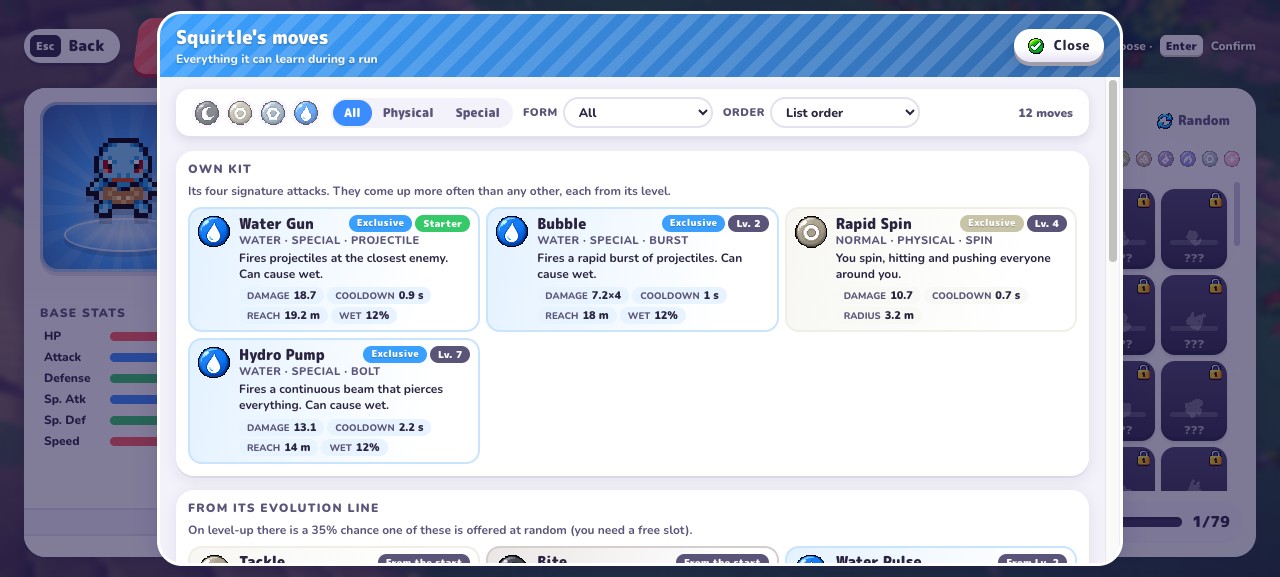
Open Play → The League → select a member → See all its moves. The v0.7.1 panel separates the own kit, evolution-line moves and shared League kits. You can filter by Physical or Special and by form.
For Squirtle, the observed own kit is shown below. These labels are the menu’s availability levels, not Pokémon evolution levels or a promise that the next offer will contain the move.
| Squirtle move | Menu label | Type / class |
|---|---|---|
| Water Gun | Starter | Water / Special |
| Bubble | Lv. 2 | Water / Special |
| Rapid Spin | Lv. 4 | Normal / Physical |
| Hydro Pump | Lv. 7 | Water / Special |
Identify what the card will change
Keep the offered action and your current move bar in view. Similar artwork or a familiar move name can make two different actions look alike. After choosing, inspect the resulting kit to see which part changed; this is more reliable than trying to remember a brief animation.
| Choice | Question before confirming |
|---|---|
| Learn another move | Will this add a different attack, and is the required space available? |
| Upgrade an owned move | Which existing move and level does the card refer to? |
| Choose a stat effect | Does the stated effect help the attacks or problem I currently have? |
Check eligibility, a free slot and the offer rule
The evolution-line section says there is a 35% chance at level-up for one move from that group to be offered at random, with a free slot required. This is the displayed rule; this guide has not measured the frequency across level-ups.
Squirtle’s panel lists Water Pulse from level 2, Rain Dance from 5, Aqua Tail from 6, Shell Smash from 7 and Wave Crash from 10; Flash Cannon is marked after Blastoise. Read the form and level conditions together.
The shared-kit description says League members sharing a type can teach moves of that shared type or Normal type. A locked member or full move bar can therefore be relevant to a missing option.
- Confirm the exact partner, move and current form.
- Check the listed minimum level and whether the move belongs to the own kit, evolution line or shared kit.
- Inspect your move bar for available space and your League for the relevant member.
- Treat an eligible random offer as a chance, not a guaranteed next choice.
More capacity is a separate decision
If your problem is space, read the fourth-slot guide before spending Stardust. If your problem is choosing between offers, use build notes to decide what you are trying to improve. A larger kit is useful only when you can explain how its additions help your actual run.
PokeBonk move not appearing: what to check
If a PokeBonk move is not appearing, find its exact name in your partner’s panel and read its level, form and kit category. Check whether the move bar has space and whether any relevant shared-kit requirement is met. Separate eligibility from selection: a random-offer rule does not guarantee the next card. Write down the missing move and your current setup before comparing another run.
Frequently asked questions
Is a move listed at level 7 guaranteed at level 7?
The panel’s level labels describe availability. The evolution-line section separately describes a random offer and a free-slot requirement. A label alone does not guarantee the next level-up card.
Are these the levels at which Squirtle evolves?
No. The table describes move availability labels. It is not an evolution-level table.
Why is my PokeBonk move not appearing?
Check the partner, listed level or form requirement, available slot and offer rule. Eligibility does not guarantee that a random offer appears at the next level-up.
Sources & research notes
The sources below distinguish our menu observations, original announcements, community reports and browser documentation. Check the version and scope before applying a value to your run.
- PokeBonk v0.7.1 — directly observed English menusOriginal project
Fresh Guest, zero completed runs and no purchases. Read starter passives, default keys, touch settings, 19 first-level Lab prices, the visible item pool, Squirtle’s move panel and mode preparation screens. Screenshots appear alongside the relevant guide sections. Combat outcomes, later-level prices and real-device touch performance were not tested.