Keep three kinds of improvement separate
Open Lab → Items for the item catalog. This fresh v0.7.1 Guest showed 67 items already in the Poké Ball pool and 35 still to discover. The examples here come from visible cards; this is not a complete catalog of locked effects.
Run items, level-up vitamins and permanent Lab upgrades have different roles. The Lab Vitamin slots upgrade adds one vitamin slot per level and has two levels; its observed first purchase is 1,200 Stardust.
| Where it belongs | What to check |
|---|---|
| Item card in Lab → Items | Effect, rarity, pool status and maximum copies. |
| Vitamin during a run | The actual offered stat change and available vitamin capacity. |
| Lab → Upgrades | Permanent effect, owned level and next Stardust cost. |
18 useful item effects and their displayed caps
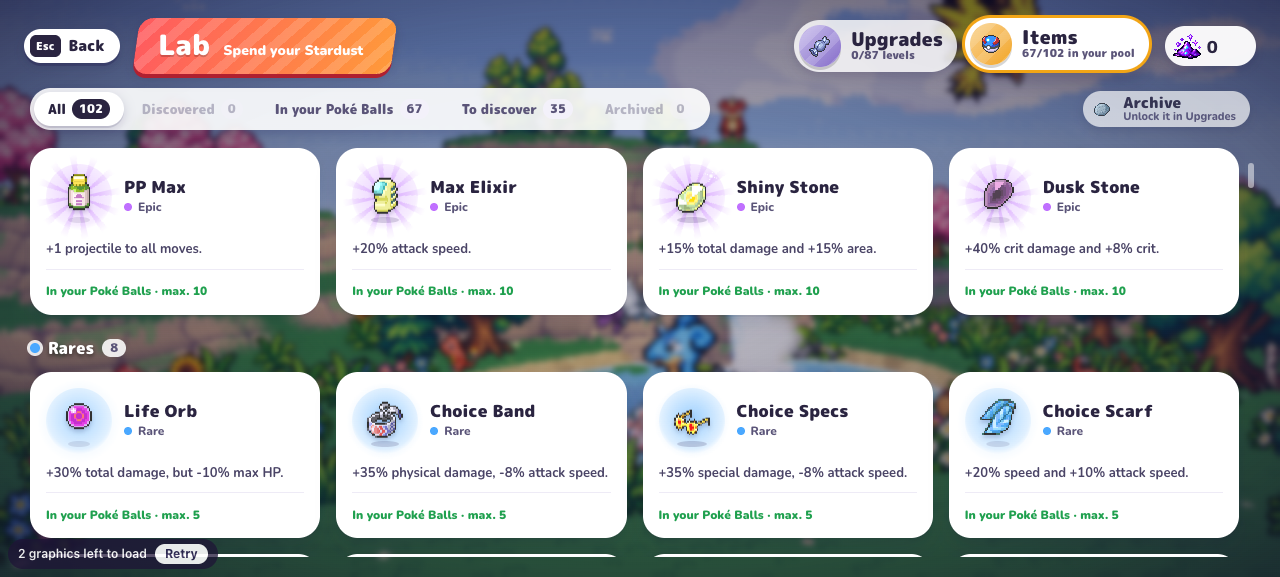
The numbers below are card descriptions checked in the original menu. A copy limit is not a complete stacking or final-damage formula. Read the downside as well as the bonus.
For example, Choice Band’s Physical bonus does not cover Squirtle’s Special Water Gun. Choice Specs matches that class, but still carries an attack-speed penalty. Whether either improves your overall run needs a comparable test.
| Item | Effect shown | Max copies |
|---|---|---|
| Life Orb | +30% total damage, but -10% max HP. | 5 |
| Choice Band | +35% physical damage, -8% attack speed. | 5 |
| Choice Specs | +35% special damage, -8% attack speed. | 5 |
| Choice Scarf | +20% speed and +10% attack speed. | 5 |
| Miracle Seed | +30% Grass-type move damage and +3% total damage. | 10 |
| Charcoal | +30% Fire-type move damage and +3% total damage. | 10 |
| Mystic Water | +30% Water-type move damage and +3% total damage. | 10 |
| Muscle Band | +15% physical damage. | 10 |
| Wise Glasses | +15% special damage. | 10 |
| Quick Claw | +10% attack speed. | 10 |
| Leftovers | +1.2 HP regen per second. | 10 |
| Shell Bell | You recover 0.8% of the damage you deal. | 10 |
| Big Root | +3% lifesteal and +15% healing. | 10 |
| Sitrus Berry | When you drop below 30% HP you recover 35% (every 45 s). | 10 |
| Exp. Share | +25% experience and +2 pickup range. | 10 |
| Amulet Coin | +20% PokéDollars. | 10 |
| Big Nugget | Poké Balls cost 8% less (up to -40%) and +5% PokéDollars. | 5 |
| Max Revive | You revive once with 60% HP. | 3 |
Check what changed after a choice
Match elemental type and damage class separately. Squirtle’s Water Gun is Water / Special, while Rapid Spin is Normal / Physical. Mystic Water describes Water damage; Choice Band describes Physical damage. Those conditions are not interchangeable.
After a choice, compare the same move or stat field in the game. A changed display is evidence of that display; measuring clear speed or survival requires comparable play.
- The Leftovers item shows +1.2 HP regeneration per second; the Lab upgrade of the same name shows +0.2 regeneration per level.
- Amulet Coin describes PokéDollars, not the Stardust balance used in this planner.
- Keep the exact card wording and version when reporting a changed effect.
Put the effect into a plan
Use the build-planning worksheet when you have several interacting choices. If your decision is a permanent purchase, move to the Lab guide and budget planner. Keep the cost calculation separate from a claim about how much faster the new build will earn currency.
Match PokeBonk item effects to a real move
Use one attack as your starting point when comparing PokeBonk items. Squirtle’s Water Gun is Water / Special, so Water-specific and Special-specific descriptions are relevant; a Physical-only bonus describes a different class. Read the downside before adding an item to your plan. This makes a PokeBonk item comparison explainable without assuming that every bonus improves every attack your partner knows.
Frequently asked questions
Can I use a standard Pokémon damage calculator?
This site has not established that the main-series formula applies to PokeBonk. Use the live effect wording and measured comparisons; our available tool calculates a Stardust budget from your inputs.
How do I check PokeBonk item effects?
Open Lab → Items and read the effect, downside and displayed copy limit. Compare type-specific and Physical or Special bonuses with the labels of the move you intend to use.
Sources & research notes
The sources below distinguish our menu observations, original announcements, community reports and browser documentation. Check the version and scope before applying a value to your run.
- PokeBonk v0.7.1 — directly observed English menusOriginal project
Fresh Guest, zero completed runs and no purchases. Read starter passives, default keys, touch settings, 19 first-level Lab prices, the visible item pool, Squirtle’s move panel and mode preparation screens. Screenshots appear alongside the relevant guide sections. Combat outcomes, later-level prices and real-device touch performance were not tested.